Skip to content

Getting your website to rank well in organic search is an uphill battle. To rank well, you need to do in-depth keyword research to see what your target audience is searching for, and write insightful and unique content based on that research. Even after doing all that work, your site could still be ignored by Google if you have a poor user experience on your page.
User experience is a ranking factor that can help site owners edge out their competition in organic search. While helpful content, quality backlinks, search intent, and local relevance are the most heavily weighted direct ranking factors, user experience remains an important direct and indirect ranking factor for websites. This guide will break down how Google evaluates a website’s user experience, how to view a website’s Google scores, and how to improve your user experience to rank better.
Key Takeaways
- Core Web Vitals are a Direct Ranking Factor: Google has confirmed that Core Web Vitals are a direct ranking factor for organic search. While high-quality content and backlink authority remain the primary ranking signals, Core Web Vitals serve as a tiebreaker between close search competitors.
- The Three Pillars of Core Web Vitals: The three metrics that Google uses to measure user experience are Largest Contentful Paint (LCP) for loading speed, Cumulative Layout Shift (CLS) for visual stability, and Interaction to Next Paint (INP) for interactivity.
- Field Data Dictates Search Rankings: Google determines Core Web Vitals scores and search rankings based on real-world user data on the website.
- Performance Standards are Continually Evolving: Google views user experience as an evolving metric and changes performance thresholds over time to align with technological advancements and shifting user satisfaction.
What Are Core Web Vitals?
Core Web Vitals are a set of performance metrics that indicate how user-friendly a website is based on a page’s load time, visual stability, and interactivity. These metrics are meant to show the real-world usability of a website.
Before Google introduced Core Web Vitals, there were 4 page experience factors that search engines used to gauge a site’s user experience: mobile friendliness, HTTPS encryption, safe browsing, and the absence of intrusive interstitials. These page experience factors are mainly pass-or-fail metrics, meaning your website either had them or didn’t. Core Web Vitals were different because your site now received a score across three pillars: loading performance, interactivity, and visual stability.
The score for each metric can be seen on Google Search Console in three specific performance buckets:
- Good (Green): Your page meets the recommended threshold and provides an optimal experience.
- Needs Improvement (Yellow): Your performance is lagging and requires minor technical optimizations.
- Poor (Red): Your page suffers from critical speed or layout issues that are actively hurting your search engine rankings.
The Three Core Web Vitals Metrics Explained
The three pillars that make up the Core Web Vitals are largest contentful paint, interaction to next paint, and cumulative layout shift. A website must meet a specific metric threshold for each of these three pillars to get a good score on Google Search Console. Let us break down exactly what these metrics measure and how they affect users:
1. Largest Contentful Paint (LCP)
Largest Contentful Paint measures how long it takes for the largest visual element on the page to load. LCP measures the loading performance of elements like the hero image, a background video, or a large block of text, to fully load on the screen.
The three categories for LCP scores are:
- Good: 2.5 seconds or less
- Needs Improvement: Between 2.5 and 4 seconds
- Poor: Longer than 4 seconds
Slower LCP scores are typically caused by slow server response times, non-optimized images, render-blocking JavaScript, or bloated source code.
2. Interaction to Next Paint (INP)
Interaction to Next Paint is the successor to First Input Delay (FID) and measures a page’s overall responsiveness by tracking the latency of all user interactions. INP measures how quickly your site responds to interactions like clicks, taps, and keyboard inputs.
Instead of taking the average of all of a user’s interactions, INP reports on the single longest response time to an interaction during their visit. The three categories for INP scores are:
- Good: 200 milliseconds or less
- Needs Improvement: Between 200 and 500 milliseconds
- Poor: Greater than 500 milliseconds
3. Cumulative Layout Shift (CLS)
Cumulative Layout Shift measures the visual stability of a webpage. The CLS score is based on how elements move on a page while it is open. Have you ever been reading an article online or attempting to click a button, only for the text to suddenly jump down the page because an ad or image loaded late? This is an example of a page with a poor CLS score. This metric is designed to ensure users have a predictable experience free of accidental clicks.
CLS is scored differently from the other two metrics; instead of being measured in seconds or milliseconds, it is calculated based on the following equation:
Layout Shift Score = Impact Fraction x Distance Fraction
- Impact Fraction: How much space the shifting element takes up on the screen
- Distance Fraction: How far the shifting element moved relative to the screen size.
The three categories for CLS scores based on this equation are:
- Good: 0.1 or less
- Needs Improvement: Between 0.1 and 0.25
- Poor: Greater than 0.25
Lab Data vs. Field Data
Now that you know the metrics being measured for a site’s Core Web Vitals, it’s time to learn how Google collects these metrics. Google collects Core Web Vitals in two different ways: lab data and field data.
Lab Data
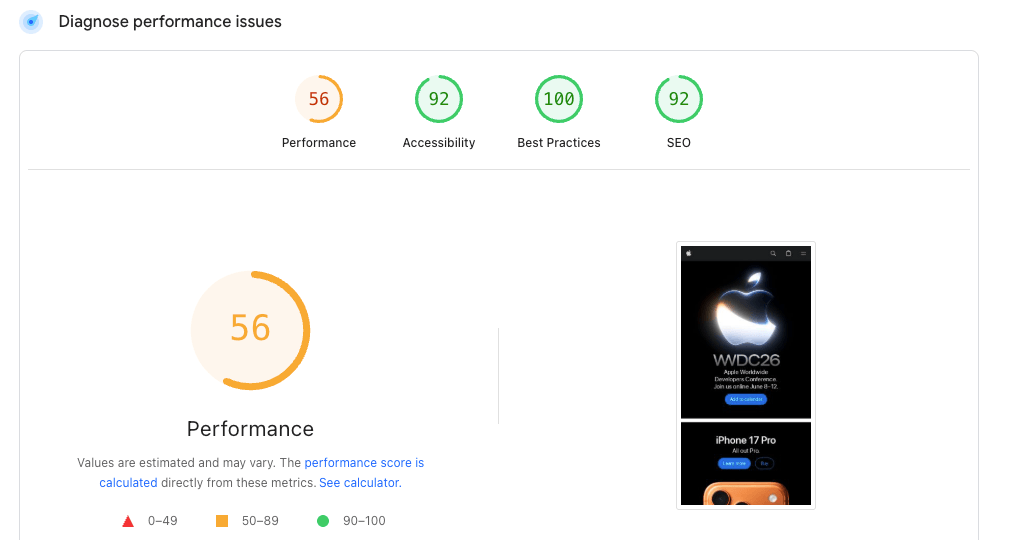
This data is generated in a controlled environment using automated tools. Google simulates user behavior under average network conditions and device capabilities to showcase the average user experience. This data can be found under the “Diagnose Performance Issues” tab on Google’s PageSpeed Insights.
Field Data (Real User Monitoring)
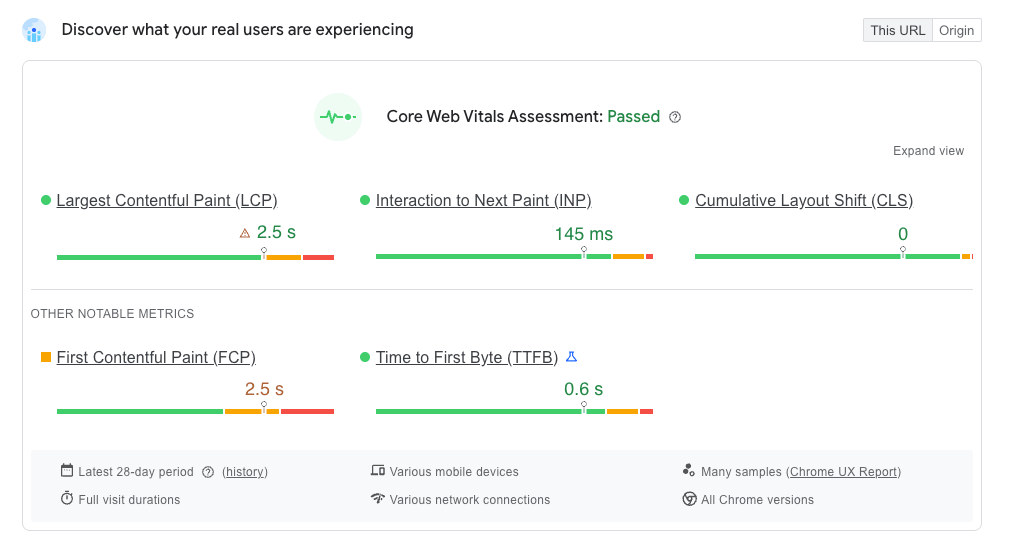
This data comes from actual Chrome user data from real visitors to your site. Google takes this data from the Chrome User Experience Report (CrUX). The field data reflects real-world variables like different network speeds, different mobile devices, and local carrier speeds. Field data can be found under the “Discover what your real users are experiencing” tab on Google’s PageSpeed Insights.
It is important to note: Google uses field data, not lab data, to determine search engine rankings.
The Best Tools for Monitoring Your Scores
Here are some free tools from Google you can use to see a website’s Core Web Vitals:
Google Search Console Core Web Vitals Report
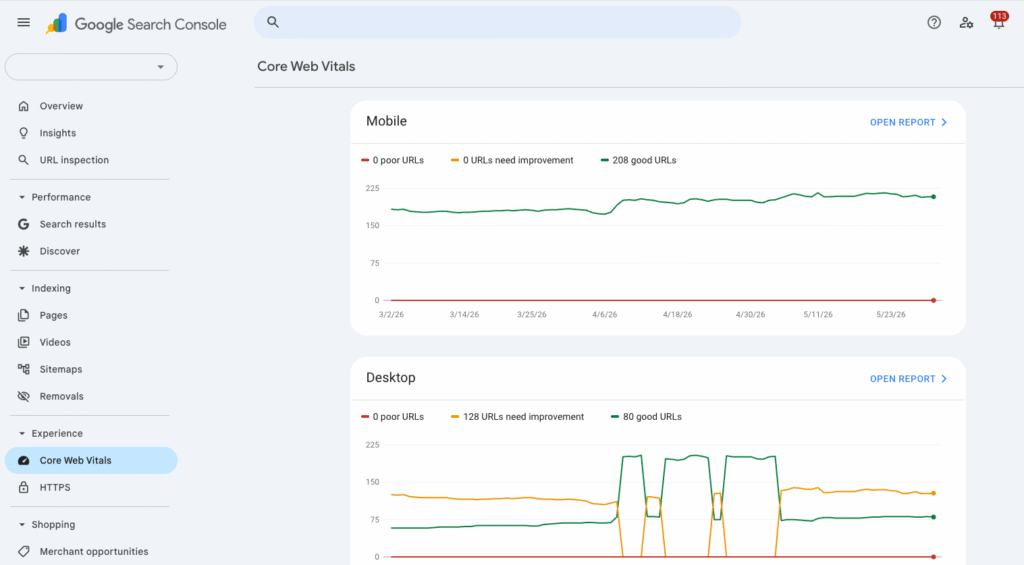
This report highlights groups of URLs on your website that are having issues based on real-user data. Search console is especially helpful for seeing what pages of your website need to be optimized and which ones are performing well.
The Core Web Vitals Report can be found under the experience tab on the navigation column on the left side of Search Console.
PageSpeed Insights
An incredibly detailed tool that provides a look at both field and lab metrics for individual pages, along with specific recommendations for improvement.
This tool allows you to see both the field and lab data for any given website. This tool is great for seeing which individual pages on your website are having issues. PageSpeed Insights will also provide specific recommendations to improve your scores for each metric. You can find Google’s PageSpeed Insights tool here.
The Evolution of Web Vitals
Google has made it clear that they do not view user experience as a static metric. Core Web Vitals are subject to change based on community feedback, changing device capabilities, and evolving web standards. This means that if your site has great Core Web Vitals now, it doesn’t mean you will forever. As the standard for a good user experience changes with tech updates like faster network speeds, the standard for Core Web Vitals will change.
With every annual update, Google reviews how effectively its current metrics align with real-user satisfaction. Google is constantly testing experimental metrics to determine whether a new metric more accurately reflects user behavior. If a new metric proves better, it will replace an existing metric, just as INP replaced FID.
FAQs About Core Web Vitals
What are core web vitals?
Core Web Vitals are a set of performance metrics that indicate how user-friendly a website is based on a page’s load time, visual stability, and interactivity. These metrics are meant to show the real-world usability of a website. The three pillars that make up the Core Web Vitals are largest contentful paint, interaction to next paint, and cumulative layout shift.
Will low Core Web Vitals scores cause my site to lose rankings?
Low scores will not cause your site to drastically lose rankings because Core Web Vitals are not a primary ranking factor, but they are used as a tie-breaker for competitive searches. This means that if you and a competitor have similar content quality and backlink authority, the one with better Core Web Vitals will rank higher.
Poor Core Web Vitals will cause high bounce rates due to poor user experience, which can affect your long-term organic search performance.
What is the difference between lab data and field data?
Lab data is hypothetical data to showcase the average user experience on a site, while field data is real user data from your website.
Lab data is generated in a controlled environment using automated tools to simulate user behavior under average network conditions and device capabilities to showcase the average user experience.
Field data comes from actual Chrome user data from real visitors to your site. Google takes this data from the Chrome User Experience Report (CrUX). The field data reflects real-world variables like different network speeds, different mobile devices, and local carrier speeds.
What is a good score for my Core Web Vitals?
In a perfect world, all of your scores on every page would be green across the board. In reality, plug-ins, images, and themes make it hard to achieve “Good” scores across the board. To achieve the best search rankings, you only need to have higher scores than your direct search competitors to win the tie-breaker if you have similar content and backlink authority.
Prioritize Your Site’s User Experience
Core Web Vitals are a great guiding light for improving your website’s user experience. Good Core Web Vitals will lead to a faster website, lower bounce rates, better conversion rates, and improved search engine rankings.
At Digital Strike – Targeted Marketing, we are here to help improve every aspect of your website so your business can be visible to potential customers. Our technical SEO services are designed to improve site performance for a user-friendly experience. Connect with us today to improve your website and get in front of more potential customers.